
Lead management for marketing agencies
You Generate the Leads. LeadCentre Helps Convert Them.
Give your clients a simple mobile app to receive, manage and follow up enquiries. Get the visibility you need to see what happens after a lead is delivered.
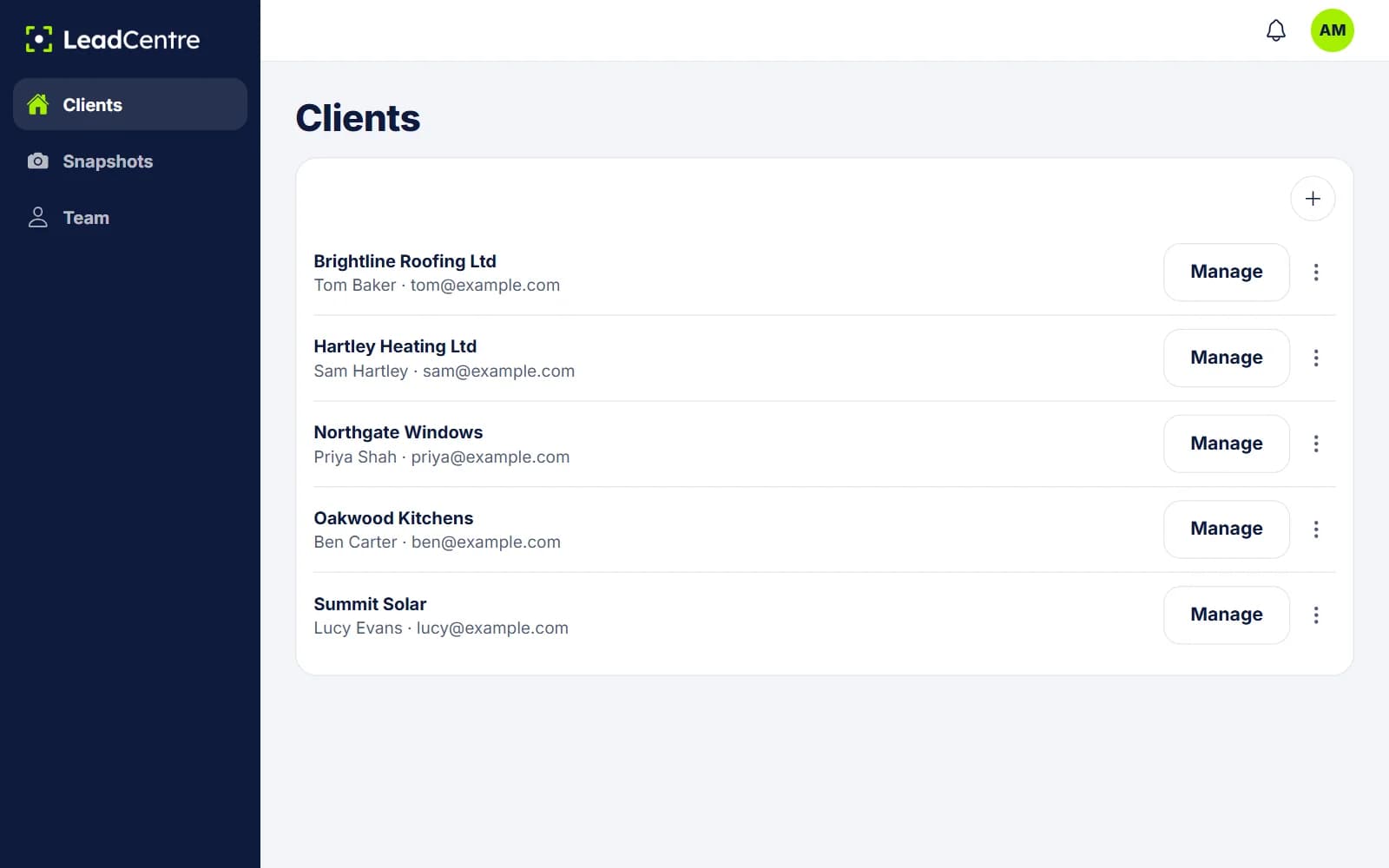
One Agency Account. A Separate Account for Every Client.
You manage everything from one place. Each client works in their own account, and never sees anyone else’s data.
Agency Admins can add clients, open any account and decide what each client’s own people can change. Agency Users only see the clients assigned to them.
- Separate leads
- Separate users
- Its own lead connections
- Its own pipeline
- Its own mobile app access
- Its own reporting
Why Agencies Choose LeadCentre
Good campaigns can look bad when nobody rings the leads back. LeadCentre helps you close that gap without becoming your client’s CRM consultant.
Improve client lead response
Clients get a push notification on their phone and can call, text or WhatsApp in one tap, instead of finding the enquiry in a shared inbox the next day.
Improve client retention
Clients often judge you on the jobs they win, not the leads you send. Helping them handle those leads gives you a role beyond the ad account.
Demonstrate campaign outcomes
Open a client and see their leads, statuses, conversions and recorded won values. A conversation about results can start from what happened to each lead.
Identify neglected opportunities
Overdue follow-ups and leads still marked New are easy to spot in a client’s account, so you can raise them before the client decides the campaign isn’t working.
Additional recurring revenue
Include LeadCentre in your retainer as a reason to choose you, or charge clients a monthly software fee on top. The pricing is yours to decide.
Simple onboarding
There’s no CRM to teach. If a client can use WhatsApp, they can use LeadCentre. Save a setup as a snapshot and reuse it for the next client.
From Subscription to Your First Client Lead
- 1
Subscribe to an agency plan
Choose Agency Starter or Agency Scale, and pay securely through Stripe.
- 2
Create client accounts
Add a client’s name and email from your portal. You can set everything up before they hear from you, or apply a saved snapshot.
- 3
Connect each client’s lead sources
Each client has its own webhook keys and field matching, so their leads only reach their account.
- 4
Invite client users
Send the invite when you’re ready. The client sets a password and can add their team, if you allow it.
- 5
Clients install the mobile app
They sign in with the same login and start getting notifications. Android is on Google Play, and the iPhone app is coming soon.
- 6
Monitor lead progress and outcomes
Open any client to see how their leads are moving and what they’ve won.
The Agency View and the Client View
What you see
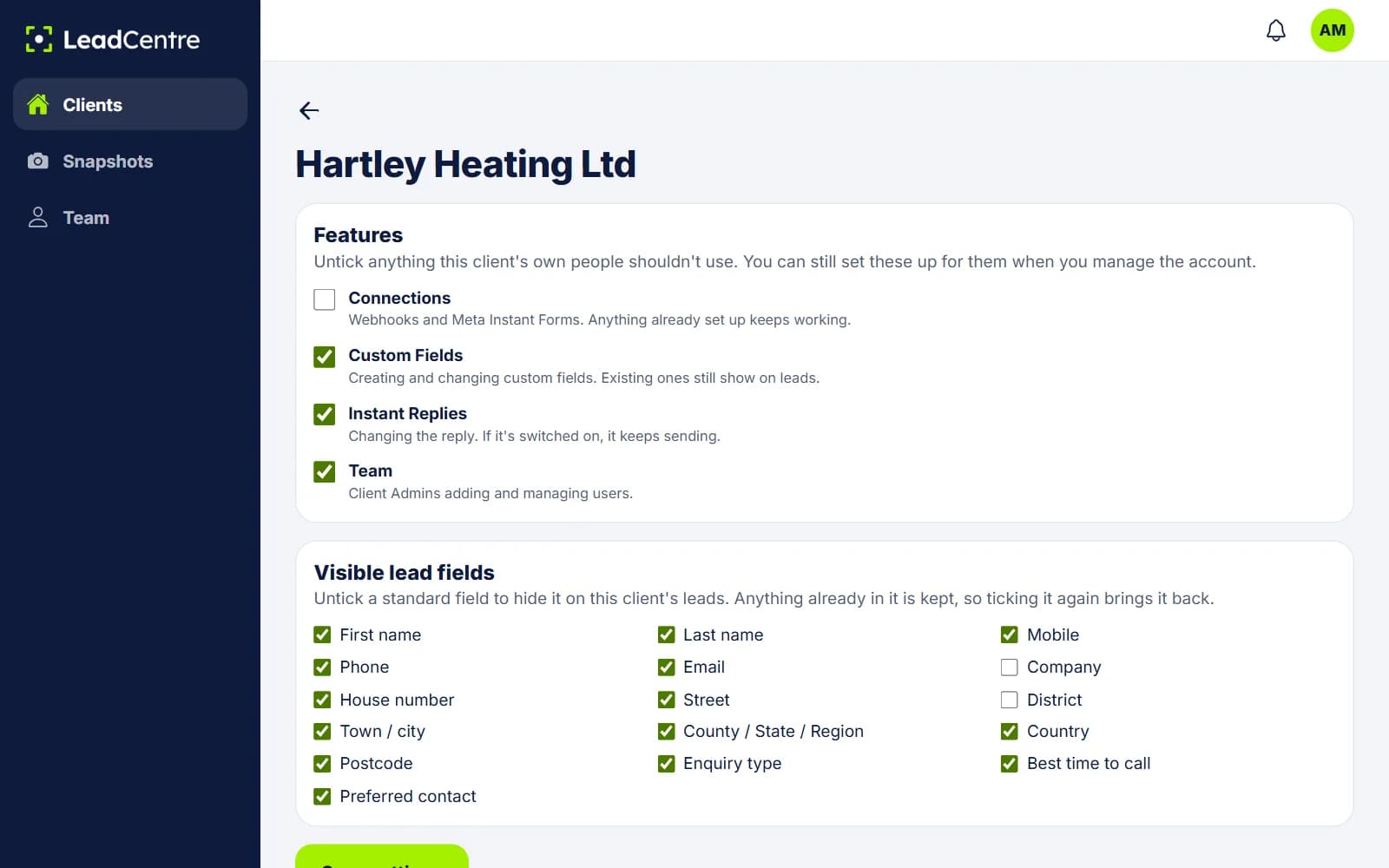
Your client list, your team, your snapshots and, for each client, controls over which features and lead fields its people can use. Press Manage on a client and you’re in their account, looking at what they see.
What your client sees
Their own leads, follow-ups, pipeline and won values, in the app and the portal. Nothing about your agency’s other clients.
Reporting across all clients Coming Soon
Today you view figures one client at a time, by opening their account. A single report across every client is planned, and it isn’t available yet.
Include It in Your Retainer, or Charge for It
LeadCentre gives you a second reason for clients to stay. How you package it is up to you.
Illustrative example only
Say you’re on Agency Scale at £249 a month with all 15 client accounts in use, and you charge each client £49 a month.
- Your cost per client
- £16.60
- You charge 15 clients
- £735
- LeadCentre costs you
- £249
- Monthly margin
- £486
Figures exclude taxes. The £49 is a made-up example, not a recommendation or a promise of what you’ll earn. Set your own price.
Agency Plans
Agency Starter includes 3 client accounts and Agency Scale includes 15. You can add more on either.
Agency Starter
For agencies giving a few clients a better way to handle their leads.
£99/month
3 client accounts, then £25/month each
Start Agency Starter- Three client accounts
- Separate client data and users
- Core LeadCentre functionality for each account
- Agency management portal
- Client setup and management
- Each client's dashboard and pipeline
- Reusable account snapshots
- Additional client accounts available
Best value for growing agencies
Agency Scale
For growing agencies rolling LeadCentre out across their client base.
£249/month
15 client accounts, then £15/month each
Start Agency Scale- 15 client accounts
- Everything in Agency Starter
- A larger account allowance
- Additional client accounts at a lower price
- Cross-client reportingComing Soon
Agency Questions
Can I add multiple clients?
Yes. Agency Starter includes 3 client accounts and Agency Scale includes 15. You add a client from your agency portal, and you can set the account up before inviting them.
Does each client receive a separate account?
Yes. Each client has its own leads, users, connections, pipeline and figures. One client can't see another's data.
Can each client have multiple users?
Yes. Each client account can have its own team, with Admin and User roles. You can also decide whether a client's own people are allowed to manage their team.
Can I connect different lead sources for each client?
Yes. Connections belong to the client account, so each client has its own webhook keys and field matching. See Connections.
Do clients pay LeadCentre directly?
No. The agency holds the subscription and pays LeadCentre. What you charge your clients, if anything, is between you and them.
Can I resell LeadCentre?
Yes. You can include it in your retainer or charge a monthly software fee on top. The product still carries the LeadCentre name, as there's no white-label option today.
Can I view my clients' lead activity?
Yes. Open any client from your agency portal and you see what they see: their dashboard, leads, statuses, follow-ups and won values. Today that's one client at a time, as cross-client reporting isn't available yet.
Can I add more client accounts later?
Yes. Additional accounts are available on both agency plans at the monthly price shown on the pricing page.
Do I need to use HighLevel?
No. LeadCentre doesn't depend on HighLevel or any other platform. If you already use one, it can send leads to LeadCentre by webhook where it supports that.
Can I use LeadCentre alongside my existing systems?
Yes. Your ad accounts, landing pages and CRM stay as they are. LeadCentre takes a copy of each lead through a connection and gives your client a simple place to work it.
Be the Agency That Knows What Happened Next.
Set up your first client account, connect their leads and see what happens after delivery.